

What is Password Protection?
Password-protected links require visitors to enter a passphrase on a gate page before being redirected to the destination URL. TyrionURL handles the gate page automatically — no additional setup needed. This is useful whenever you want to share a link with a specific, vetted audience rather than the open internet.Feature Overview
When to Use Password Protection
- Pre-launch pages — Share a coming-soon landing page with beta users before public launch
- Internal documents — Share a link to internal content without requiring account creation from recipients
- Exclusive offers — Gate a discount page behind a code communicated in a newsletter or event
- Private portfolios — Share sensitive design work or proposals with specific clients
- Media embargoes — Give journalists access to a press release before a public announcement date
Setting Up a Password-Protected Link
1
Paste Your Destination URL
In your Dashboard, enter the URL you want to protect into the shortener input field.
2
Open Advanced Settings
Click Advanced Settings to expand the options panel.
3
Enable Password Protection
Toggle Password Protect to on. A password input field will appear.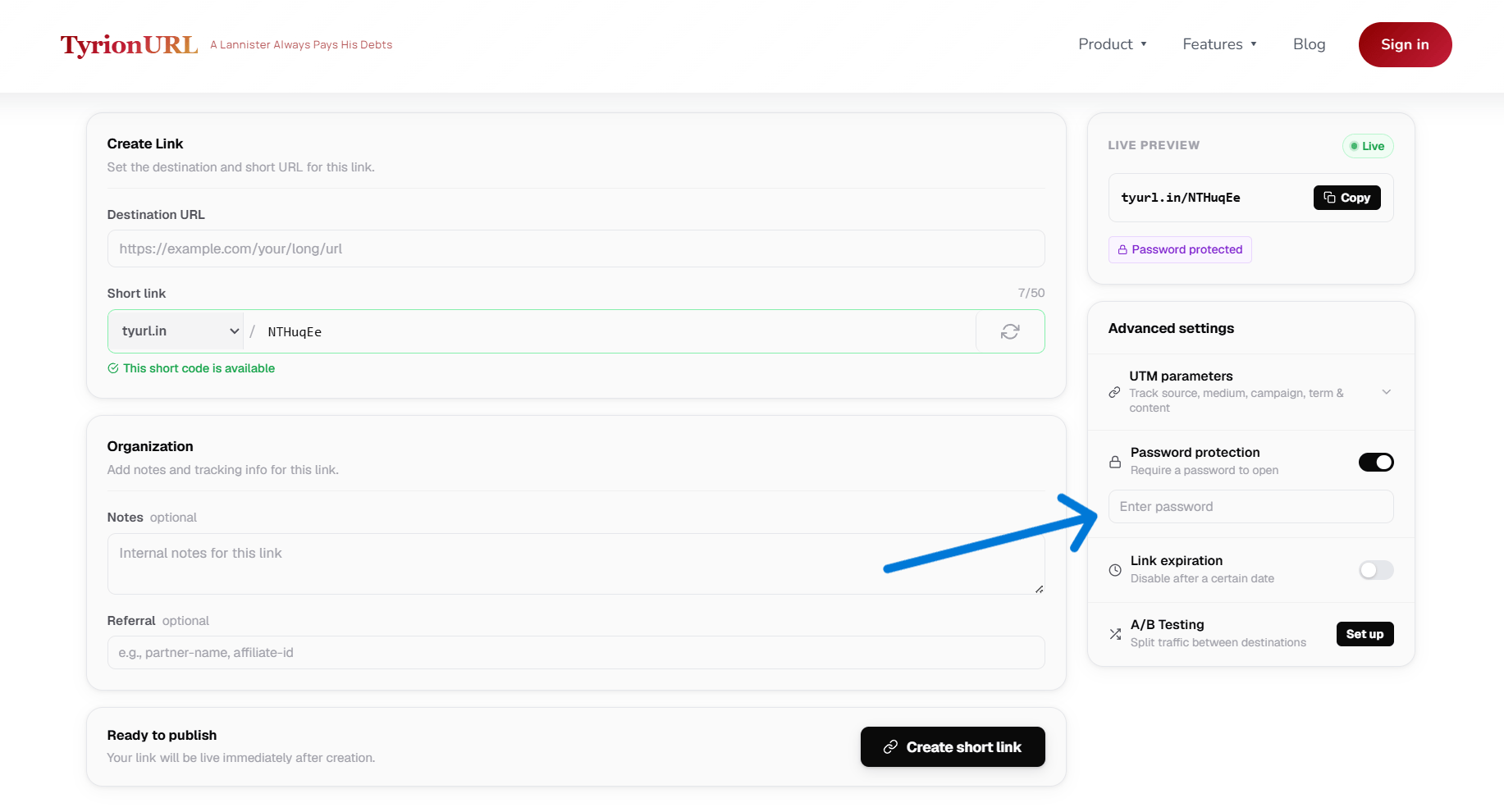
4
Set Your Password
Enter a password in the field. Choose something that:
- Is easy for your intended audience to type
- Is not easily guessable by the general public
- Can be communicated separately from the link itself
5
Create the Link
Click Shorten. Your password-protected link is created.
6
Share the Link and Password Separately
Send the short link via your primary channel and communicate the password through a separate channel (e.g., link in email, password in a follow-up SMS).
The Visitor Experience
When a visitor opens a password-protected short link:- They land on a TyrionURL password gate page — a clean form asking for the passphrase
- They enter the password and click Submit
- If correct, they are immediately redirected to the destination URL
- If incorrect, an error message prompts them to try again
Best Practices
Communicate the password through a different channel than the link — this prevents the link from being useful to anyone who intercepts just the URL.
Use a password that’s short and typeable, especially if visitors may be entering it on mobile.
Combine password protection with a custom alias so the link itself is professional-looking even though it’s gated.
If the intended audience is large, consider whether a more scalable access control mechanism is appropriate.
Common Mistakes
Related Features
Custom Aliases
Give password-protected links a readable name.
Secure Document Sharing
Share files securely without requiring a download.
URL Shortening Overview
Back to the shortening feature overview.
Analytics
See who accessed your protected links.