> ## Documentation Index
> Fetch the complete documentation index at: https://docs.tyrionurl.com/llms.txt
> Use this file to discover all available pages before exploring further.
# Quickstart Guide
> Go from zero to your first short link in under 2 minutes.
## Before You Begin
You can shorten a URL on TyrionURL without an account. However, to save your links, view analytics, and access advanced features, you'll need a free account.
Sign up in 30 seconds — no credit card required.
Already have an account? Jump straight in.
***
## Step 1: Shorten Your First URL
Navigate to your [TyrionURL](https://tyrionurl.com) and locate the URL input field at the top of the page.
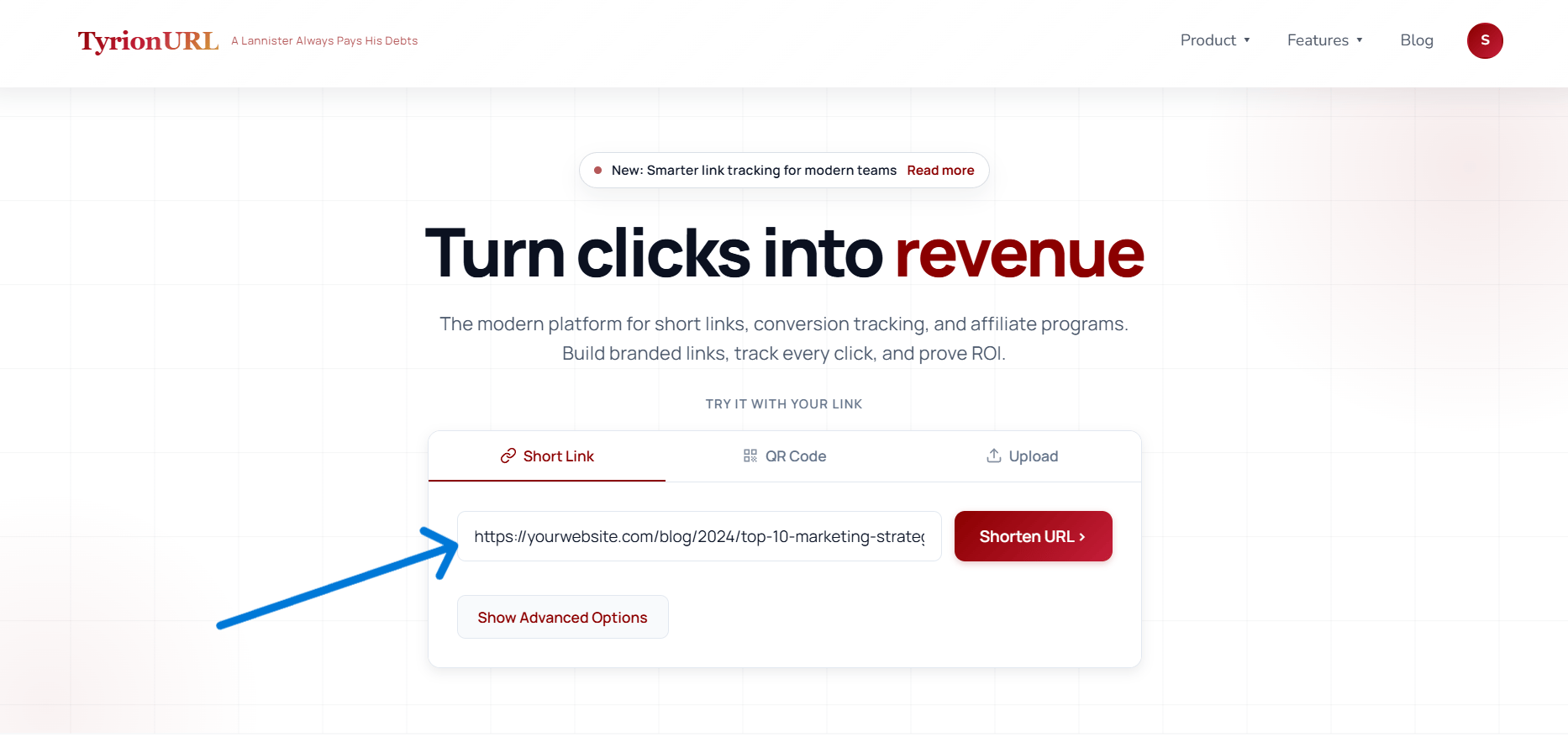 Paste any URL — a product page, blog post, social profile, or any web address — into the input field.
```
https://yourwebsite.com/blog/2024/top-10-marketing-strategies-for-ecommerce-growth
```
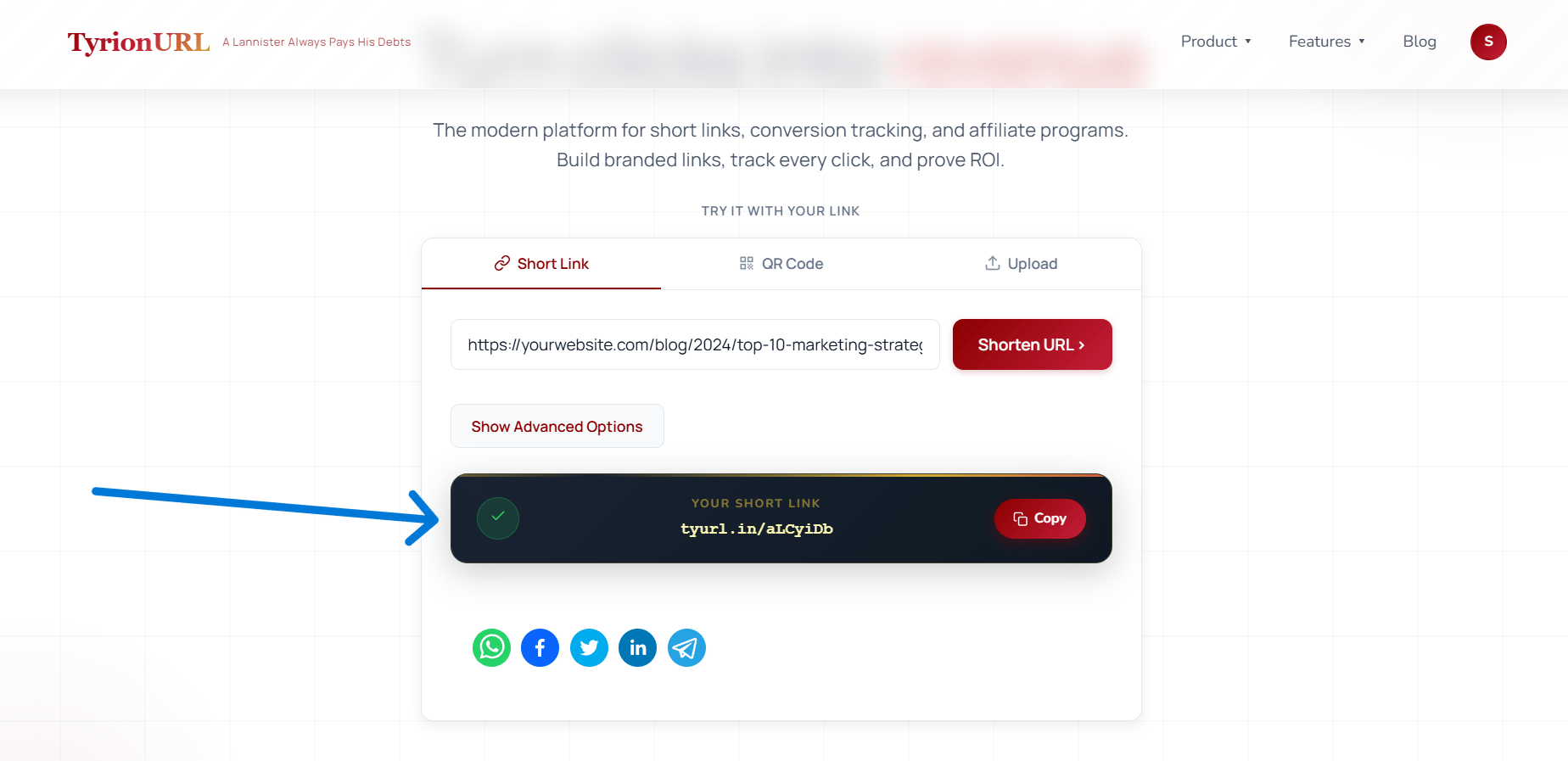
Press the **Shorten** button. TyrionURL instantly generates a short link.
```
https://t.tyrionurl.com/a8f2k
```
Click the **Copy** icon next to your new short link. It's ready to paste anywhere — email, social media, SMS, or print.
Paste any URL — a product page, blog post, social profile, or any web address — into the input field.
```
https://yourwebsite.com/blog/2024/top-10-marketing-strategies-for-ecommerce-growth
```
Press the **Shorten** button. TyrionURL instantly generates a short link.
```
https://t.tyrionurl.com/a8f2k
```
Click the **Copy** icon next to your new short link. It's ready to paste anywhere — email, social media, SMS, or print.
 ***
## Step 2: Add Optional Settings (Advanced)
Before you click Shorten, you can expand the **Advanced Settings** panel to configure additional options:
Set a memorable slug instead of a random code.
* **Example:** `/summer-launch` instead of `/a8f2k`
* Custom aliases must be unique across TyrionURL.
* Available on registered accounts only.
Require visitors to enter a password before being redirected.
* Useful for sharing private links with a specific audience.
* The password is set by you at the time of link creation.
Split traffic between two destination URLs.
* Configure a percentage split (e.g., 50/50 or 70/30).
* Available after initial link creation via the link settings panel.
***
## Step 3: View Analytics
Once your link has received clicks, you can view its performance:
From your dashboard, find the link and click the **Analytics** icon or link name to open the analytics view.
You'll see:
* **Click volume** over time (hourly, daily, weekly)
* **Geographic breakdown** — country and city-level heatmap
* **Device and browser** distribution
* **Referrer sources** — where visitors came from
Switch to the **Live** tab to watch clicks arrive in real time via the live traffic monitor.
→ Full details: [Analytics Dashboard](/analytics/overview)
***
## What's Next?
Now that you've created your first short link, explore what else TyrionURL can do:
Make your links memorable with a custom slug.
Understand who's clicking and where they're coming from.
Build a link-in-bio page for your social profiles.
Generate a branded QR code for offline use.
***
## Step 2: Add Optional Settings (Advanced)
Before you click Shorten, you can expand the **Advanced Settings** panel to configure additional options:
Set a memorable slug instead of a random code.
* **Example:** `/summer-launch` instead of `/a8f2k`
* Custom aliases must be unique across TyrionURL.
* Available on registered accounts only.
Require visitors to enter a password before being redirected.
* Useful for sharing private links with a specific audience.
* The password is set by you at the time of link creation.
Split traffic between two destination URLs.
* Configure a percentage split (e.g., 50/50 or 70/30).
* Available after initial link creation via the link settings panel.
***
## Step 3: View Analytics
Once your link has received clicks, you can view its performance:
From your dashboard, find the link and click the **Analytics** icon or link name to open the analytics view.
You'll see:
* **Click volume** over time (hourly, daily, weekly)
* **Geographic breakdown** — country and city-level heatmap
* **Device and browser** distribution
* **Referrer sources** — where visitors came from
Switch to the **Live** tab to watch clicks arrive in real time via the live traffic monitor.
→ Full details: [Analytics Dashboard](/analytics/overview)
***
## What's Next?
Now that you've created your first short link, explore what else TyrionURL can do:
Make your links memorable with a custom slug.
Understand who's clicking and where they're coming from.
Build a link-in-bio page for your social profiles.
Generate a branded QR code for offline use.